- 公開日
- 最終更新日
【Config + EventBridge】VPC Flow Logの未設定を自動検知・修復する仕組みを構築してみた
この記事を共有する


目次
はじめに
皆さんこんにちは!パーソル&サーバーワークスの小泉です。
今回はAWS Config カスタムルールとEventBridgeを組み合わせて、特定のVPC Flow Logが設定されていないVPCを自動検知し、自動で修復(Flow Logを作成)する仕組みを構築しました。
なぜこれをやったのか
VPC Flow Logはネットワークトラフィックの可視化や監査に不可欠ですが、以下のような課題があります。
- VPCを新規作成した際にFlow Logの設定を忘れてしまうことがある
- 手動での設定確認は運用負荷が高い
そこで、Configで定期的にチェックし、未設定であれば自動でFlow Logを作成する仕組みを構築することで、人的ミスを排除し設定を維持できる状態を目指しました。
構成図
今回の構成は以下の通りです。
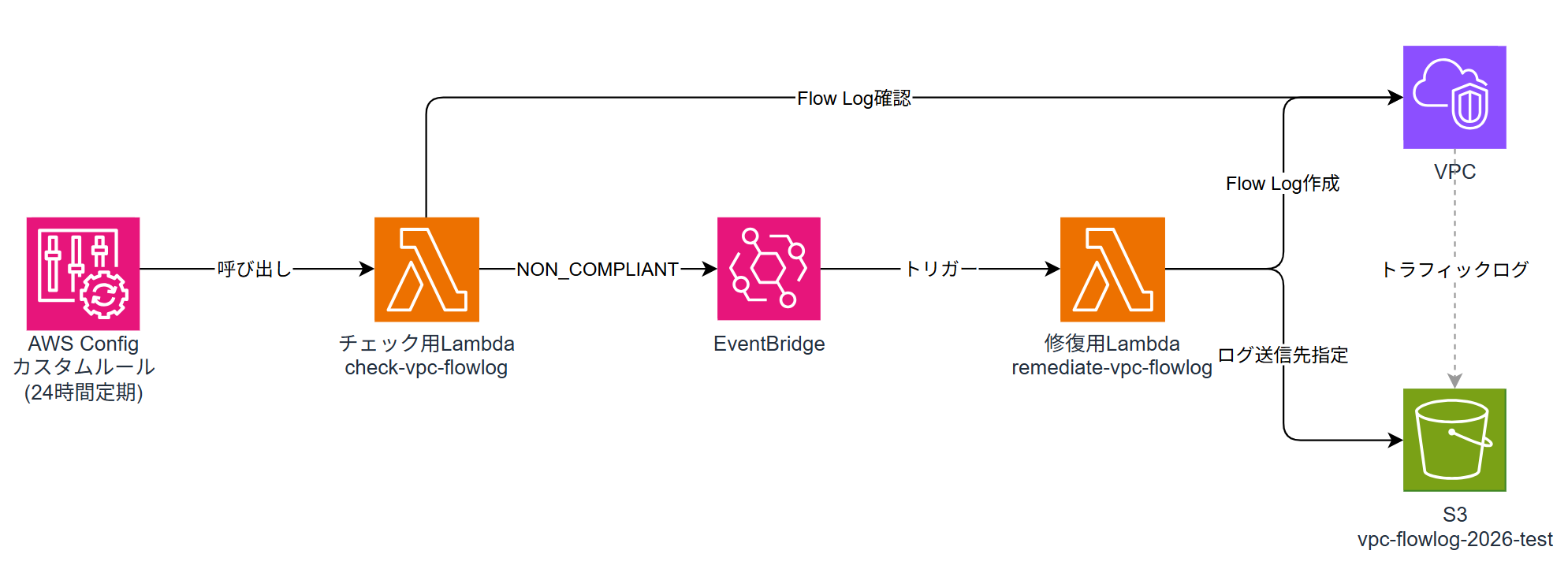
- AWS Config(カスタムルール)が24時間おきに全VPCをスキャン
- vpc-flowlog-2026-testのFlow Logが存在するかチェック
- 未設定(NON_COMPLIANT)の場合、EventBridgeがイベントを検知
- 修復用LambdaがS3バケット(vpc-flowlog-2026-test)宛にFlow Logを自動作成
構築方法
前提条件
- S3バケット
vpc-flowlog-2026-testが作成済みであること - S3バケットポリシーで
delivery.logs.amazonaws.comからの書き込みが許可されていること
デプロイ
今回はCloudFormationテンプレート1つにすべてのリソースを定義しています。
template.yaml
AWSTemplateFormatVersion: "2010-09-09"
Description: Config Custom Rule - VPC Flow Log (Name tag) check with S3 remediation
Resources:
  # ========== チェック用Lambda ==========
  CheckVpcFlowlogRole:
    Type: AWS::IAM::Role
    Properties:
      RoleName: CheckVpcFlowlogRole
      AssumeRolePolicyDocument:
        Version: "2012-10-17"
        Statement:
          - Effect: Allow
            Principal:
              Service: lambda.amazonaws.com
            Action: sts:AssumeRole
      ManagedPolicyArns:
        - arn:aws:iam::aws:policy/service-role/AWSLambdaBasicExecutionRole
      Policies:
        - PolicyName: CheckVpcFlowlogPolicy
          PolicyDocument:
            Version: "2012-10-17"
            Statement:
              - Effect: Allow
                Action:
                  - ec2:DescribeFlowLogs
                  - ec2:DescribeVpcs
                Resource: "*"
              - Effect: Allow
                Action:
                  - config:PutEvaluations
                Resource: "*"
  CheckVpcFlowlogFunction:
    Type: AWS::Lambda::Function
    Properties:
      FunctionName: check-vpc-flowlog
      Runtime: python3.12
      Handler: index.handler
      Role: !GetAtt CheckVpcFlowlogRole.Arn
      Code:
        ZipFile: |
          import json
          import boto3
          from datetime import datetime
          config_client = boto3.client("config")
          ec2_client = boto3.client("ec2")
          TARGET_FLOWLOG_NAME = "vpc-flowlog-2026-test"
          def evaluate_compliance(vpc_id):
              response = ec2_client.describe_flow_logs(
                  Filters=[{"Name": "resource-id", "Values": [vpc_id]}]
              )
              for fl in response["FlowLogs"]:
                  tags = {t["Key"]: t["Value"] for t in fl.get("Tags", [])}
                  if tags.get("Name") == TARGET_FLOWLOG_NAME:
                      return "COMPLIANT"
              return "NON_COMPLIANT"
          def handler(event, context):
              invoking_event = json.loads(event["invokingEvent"])
              # 全VPCを取得して評価
              vpcs = ec2_client.describe_vpcs()["Vpcs"]
              evaluations = []
              for vpc in vpcs:
                  vpc_id = vpc["VpcId"]
                  evaluations.append({
                      "ComplianceResourceType": "AWS::EC2::VPC",
                      "ComplianceResourceId": vpc_id,
                      "ComplianceType": evaluate_compliance(vpc_id),
                      "OrderingTimestamp": datetime.utcnow().isoformat(),
                  })
              config_client.put_evaluations(
                  Evaluations=evaluations,
                  ResultToken=event["resultToken"],
              )
  CheckVpcFlowlogPermission:
    Type: AWS::Lambda::Permission
    Properties:
      FunctionName: !GetAtt CheckVpcFlowlogFunction.Arn
      Action: lambda:InvokeFunction
      Principal: config.amazonaws.com
  # ========== Config カスタムルール ==========
  VpcFlowlogConfigRule:
    Type: AWS::Config::ConfigRule
    Properties:
      ConfigRuleName: vpc-flowlog-check
      MaximumExecutionFrequency: TwentyFour_Hours
      Source:
        Owner: CUSTOM_LAMBDA
        SourceIdentifier: !GetAtt CheckVpcFlowlogFunction.Arn
        SourceDetails:
          - EventSource: aws.config
            MessageType: ScheduledNotification
            MaximumExecutionFrequency: TwentyFour_Hours
    DependsOn: CheckVpcFlowlogPermission
  # ========== 修復用Lambda ==========
  RemediateVpcFlowlogRole:
    Type: AWS::IAM::Role
    Properties:
      RoleName: RemediateVpcFlowlogRole
      AssumeRolePolicyDocument:
        Version: "2012-10-17"
        Statement:
          - Effect: Allow
            Principal:
              Service: lambda.amazonaws.com
            Action: sts:AssumeRole
      ManagedPolicyArns:
        - arn:aws:iam::aws:policy/service-role/AWSLambdaBasicExecutionRole
      Policies:
        - PolicyName: RemediateVpcFlowlogPolicy
          PolicyDocument:
            Version: "2012-10-17"
            Statement:
              - Effect: Allow
                Action:
                  - ec2:CreateFlowLogs
                  - ec2:CreateTags
                  - logs:CreateLogDelivery
                  - logs:DeleteLogDelivery
                Resource: "*"
              - Effect: Allow
                Action:
                  - s3:PutObject
                  - s3:GetBucketLocation
                Resource:
                  - arn:aws:s3:::vpc-flowlog-2026-test
                  - arn:aws:s3:::vpc-flowlog-2026-test/*
  RemediateVpcFlowlogFunction:
    Type: AWS::Lambda::Function
    Properties:
      FunctionName: remediate-vpc-flowlog
      Runtime: python3.12
      Handler: index.handler
      Role: !GetAtt RemediateVpcFlowlogRole.Arn
      Code:
        ZipFile: |
          import json
          import boto3
          ec2_client = boto3.client("ec2")
          TARGET_FLOWLOG_NAME = "vpc-flowlog-2026-test"
          S3_BUCKET_ARN = "arn:aws:s3:::vpc-flowlog-2026-test"
          def handler(event, context):
              print(json.dumps(event))
              detail = event.get("detail", {})
              vpc_id = detail.get("resourceId", "")
              if not vpc_id:
                  print("No resourceId found in detail")
                  return
              print(f"Creating flow log for {vpc_id}")
              response = ec2_client.create_flow_logs(
                  ResourceIds=[vpc_id],
                  ResourceType="VPC",
                  TrafficType="ALL",
                  LogDestinationType="s3",
                  LogDestination=S3_BUCKET_ARN,
                  TagSpecifications=[{
                      "ResourceType": "vpc-flow-log",
                      "Tags": [{"Key": "Name", "Value": TARGET_FLOWLOG_NAME}],
                  }],
              )
              print(f"Response: {json.dumps(response, default=str)}")
  # ========== EventBridge ルール ==========
  ConfigNonCompliantRule:
    Type: AWS::Events::Rule
    Properties:
      Name: vpc-flowlog-noncompliant-rule
      EventPattern:
        source:
          - aws.config
        detail-type:
          - Config Rules Compliance Change
        detail:
          messageType:
            - ComplianceChangeNotification
          configRuleName:
            - vpc-flowlog-check
          newEvaluationResult:
            complianceType:
              - NON_COMPLIANT
      Targets:
        - Id: RemediateVpcFlowlog
          Arn: !GetAtt RemediateVpcFlowlogFunction.Arn
  EventBridgeLambdaPermission:
    Type: AWS::Lambda::Permission
    Properties:
      FunctionName: !GetAtt RemediateVpcFlowlogFunction.Arn
      Action: lambda:InvokeFunction
      Principal: events.amazonaws.com
      SourceArn: !GetAtt ConfigNonCompliantRule.Arn
Outputs:
  ConfigRuleName:
    Value: !Ref VpcFlowlogConfigRule
  CheckFunctionArn:
    Value: !GetAtt CheckVpcFlowlogFunction.Arn
  RemediateFunctionArn:
    Value: !GetAtt RemediateVpcFlowlogFunction.Arn
  EventBridgeRuleArn:
    Value: !GetAtt ConfigNonCompliantRule.Arn
aws cloudformation deploy \
  --template-file template.yaml \
  --stack-name vpc-flowlog-config-rule \
  --capabilities CAPABILITY_NAMED_IAM \
  --region ap-northeast-1
テンプレートで作成されるリソースは以下の通りです。
- チェック用Lambda + IAMロール
- Configカスタムルール(24時間定期実行)
- 修復用Lambda + IAMロール
- EventBridgeルール + Lambda呼び出し許可
動作確認
Configルールの確認
デプロイ後、Configコンソールでvpc-flowlog-checkルールを確認します。
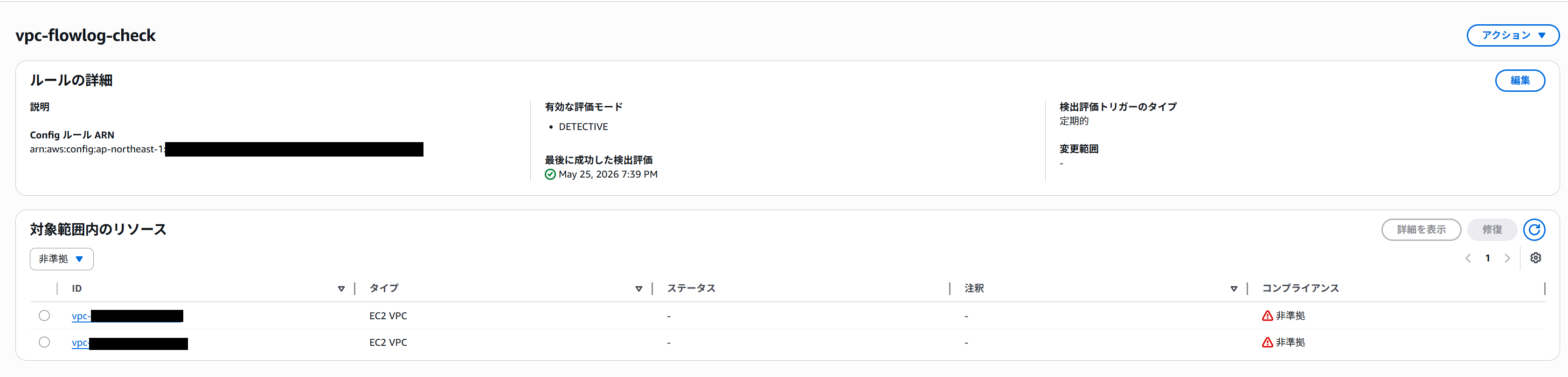
アカウント内(東京リージョン)の全VPCが評価され、Flow Log(vpc-flowlog-2026-test)が未設定のVPCは非準拠として検出されています。
修復前のVPCの状態
修復前のVPCを確認すると、フローログが設定されていないことがわかります。

修復後のVPCの状態
EventBridgeが非準拠を検知し、修復用Lambdaが実行された後、VPCにFlow Logが作成されていることが確認できます。

- Name:
vpc-flowlog-2026-test - 送信先タイプ:
s3 - 送信先名:
vpc-flowlog-2026-test - トラフィックタイプ: すべて
S3バケットの確認
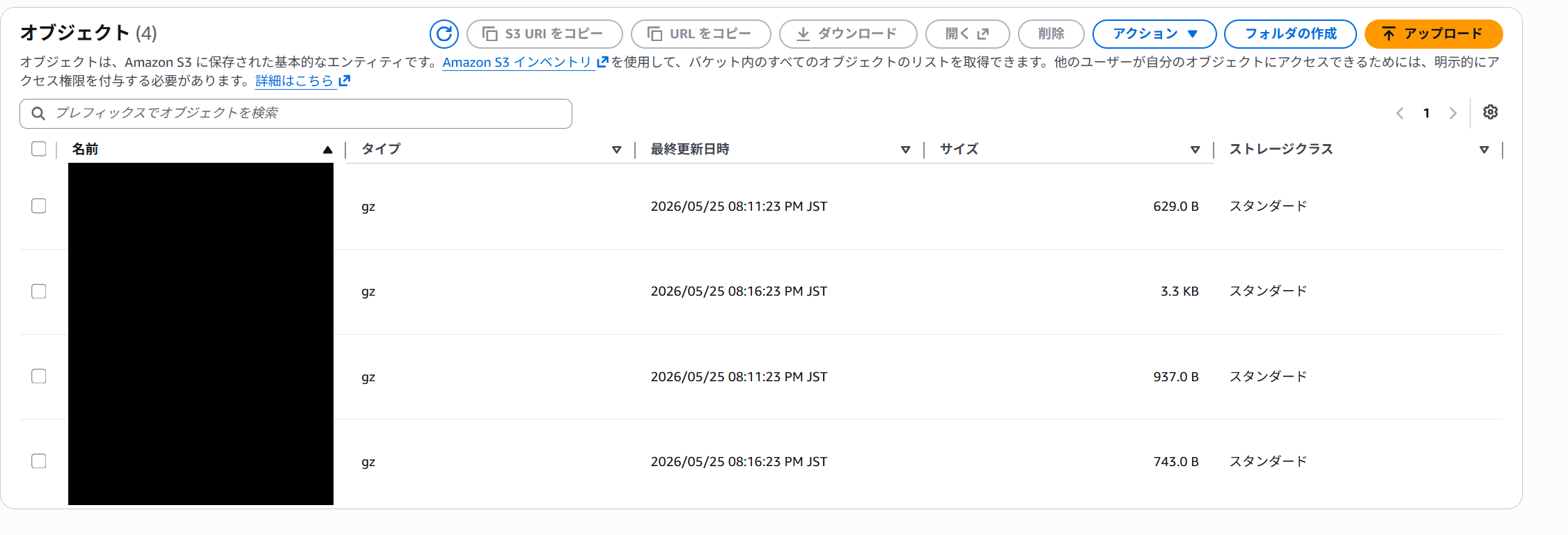
送信先のS3バケットvpc-flowlog-2026-testを確認します。Flow Logの配信が開始されるとオブジェクトが格納されます。
まとめ
最近は、作成した基盤や仕組みに対していかに手動運用をなくせないかを考えて業務をするのが好きです。
この記事は私が書きました
小泉 和貴
記事一覧全国を旅行することを目標に、仕事を頑張っています。